Children Stories Font Review: A Whimsical Display Typeface
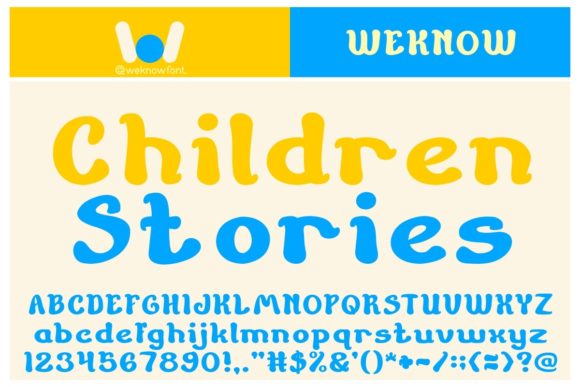
Opening a blank brand board one afternoon, I was looking for a font that could bring a sense of wonder to a new boutique identity project. The challenge was clear—something playful yet professional, with enough character to stand out without being overwhelming. That’s when I stumbled upon Children Stories, a display font that immediately caught my eye with its wavy and cute appearance.
A Playful Yet Professional Presence
Children Stories is a display font that walks the fine line between whimsy and modernity. Its curves are gentle and inviting, giving off a soft, childlike charm that feels both nostalgic and fresh. The letterforms have a slight wavy edge, which adds a touch of spontaneity and warmth to any design it touches. It's not just cute—it's got personality, and that makes all the difference in branding.
The font has a modern yet whimsical style, making it ideal for projects that aim to evoke joy, creativity, or a sense of playfulness. Whether it's used on a logo, packaging, or social media post, Children Stories brings an air of magic to the visuals, making them more engaging and memorable.
Testing in Real Branding Projects
I tested Children Stories across several elements of a boutique identity project, from a logo concept to a packaging mockup and even a website header. On a logo draft, it worked beautifully as a primary typeface, adding a unique flair that set the brand apart from competitors. The font’s subtle waviness gave the logo a dynamic feel, making it feel alive and approachable.
On a packaging mockup, it looked great as a headline on product labels. The whimsical nature of the font made the packaging feel more personal and handcrafted, which aligned perfectly with the boutique's brand voice. For a business card, I paired it with a clean sans serif font for body text, which created a nice contrast and helped maintain readability without sacrificing charm.
In a website header, the font added a touch of elegance while still feeling friendly. It didn’t overwhelm the design but instead complemented the overall aesthetic. On Instagram posts, it performed well as a short phrase font, drawing attention and encouraging engagement.
Where Children Stories Shines and Where It Might Fall Short
Children Stories excels as a display font, headline font, or accent font. It’s best suited for short phrases, logos, and decorative elements where visual impact is key. However, it may not be the best choice for long body text or formal corporate use due to its stylized nature. When scaled down, the wavy edges can become less legible, so it's important to test it at different sizes before finalizing any design.
Projects that require a high level of professionalism or readability—such as legal documents, academic publications, or financial reports—may not benefit from this font. But for creative industries like children’s publishing, handmade shops, bakeries, or cafes, Children Stories can be a game-changer.
Font Pairing and Practical Tips
When pairing Children Stories, I found that combining it with a clean sans serif font like Helvetica Neue or a modern serif font like Playfair Display creates a balanced look. The contrast helps highlight the whimsical nature of the display font while keeping the overall design professional.
It also works well with handwritten or script fonts for a more organic feel. Just be mindful of the weight and spacing to ensure the pairing doesn’t become too cluttered.
If you're considering using Children Stories in client work, make sure to check the commercial font licensing. It’s crucial to ensure you have the right to use it in your brand identity, packaging, templates, websites, or print-on-demand products. Always review the included styles, alternates, ligatures, swashes, weights, and multilingual support to see if they meet your needs.
Before committing to a final design, test the font in various contexts—on a shop sign, product mockup, homepage hero section, or printed card. Seeing how it performs in real-world scenarios will help you determine if it's the right fit for your project.