Sticky Chewy: A Playful Display Font for Web Projects
I was working on a redesign for a boutique online store selling handmade stationery, and I needed a font that could bring some personality to the hero section. The client wanted something memorable but still professional enough for an e-commerce site. That’s when I stumbled upon Sticky Chewy.
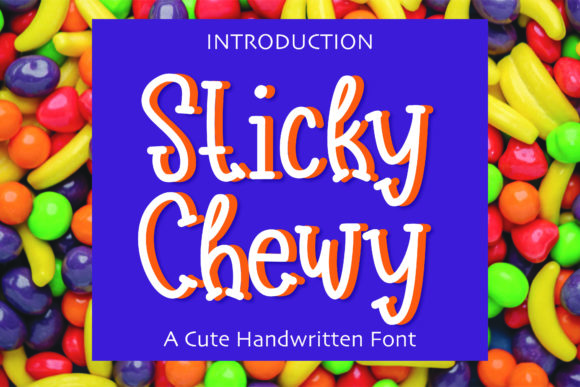
Sticky Chewy is a quirky and fun display font with a playful yet refined look. It has a unique texture and slight irregularity in the letterforms that make it stand out without feeling too chaotic. Its character shapes have a soft, almost chewy quality, which gives it a tactile feel on screen. This makes it perfect for creative projects where you want to inject some visual interest without sacrificing readability.
Testing Sticky Chewy in Real Design Scenarios
I first tested Sticky Chewy in the hero section of the website. I placed it over a full-width image of handcrafted cards and watched how it interacted with the background. The font didn’t overpower the image, and the contrast between the text and the background made the headline pop. It felt like the right balance between whimsical and approachable.
Next, I tried using it for section headings across different pages. On the product detail page, Sticky Chewy worked well as the title for each item. It added a touch of character without making the content hard to read. For smaller buttons and call-to-action areas, I opted for a simpler sans serif font, which kept the interface clean and easy to navigate.
Where Sticky Chewy Shines Best
Sticky Chewy excels as a headline or title font. It's not ideal for long paragraphs or body copy due to its decorative nature. However, it works beautifully for short phrases, banners, and promotional graphics. I found it particularly useful for landing pages, course sales pages, and blog headers where a bold statement is needed.
On the coaching website I recently worked on, I used Sticky Chewy for the main heading on the homepage. It gave the brand a friendly and engaging vibe that matched the tone of the content. When paired with a clean sans serif font for the rest of the site, the contrast helped guide the user's eye naturally through the layout.
Readability and Responsiveness Considerations
One thing I always check when selecting a display font is how it performs on mobile devices. Sticky Chewy holds up well on smaller screens, especially when given enough space. I made sure to adjust the line height and spacing to prevent any overlap or crowding, which can happen with more stylized fonts.
For dark backgrounds, I experimented with different text colors to ensure good contrast. A light gray or white color worked best, allowing the font’s details to remain visible. I also avoided using Sticky Chewy on very small buttons, as its style might be too intricate for such limited space.
Font Pairing and Brand Consistency
Pairing Sticky Chewy with a complementary font is key to maintaining a cohesive design. I often use a modern sans serif font like Montserrat or Open Sans for body text. This combination creates a nice contrast between the playful and the practical, helping to establish a clear visual hierarchy.
In a digital brand kit I created for a lifestyle blog, Sticky Chewy was used for the logo and headlines, while a minimalist serif font was used for subheadings and captions. This approach helped reinforce the brand's identity while keeping the overall design polished and professional.
Practical Tips for Using Sticky Chewy
Before implementing Sticky Chewy on a live site, I always check if it includes the necessary styles, weights, and multilingual support. It's important to confirm that the font is available as a webfont and that it loads quickly, especially for high-traffic websites or online stores.
I also review the licensing terms to ensure it's appropriate for the project—whether it's a personal blog, a client website, or a commercial product. Some fonts require specific licenses for web use, and it's crucial to respect those guidelines to avoid any legal issues down the line.
Finally, I test Sticky Chewy across different platforms and browsers to ensure it renders consistently. While most modern browsers handle webfonts well, it's always good to double-check for any unexpected rendering issues.
Overall, Sticky Chewy has become a go-to font for adding a touch of personality to various web projects. Whether it's a creative portfolio, an online shop, or a course landing page, this font brings a sense of playfulness that can elevate the overall design and user experience.